


Many leaders compare OpenClaw, Zapier, and Make as if they were the same kind of product. They look at integrations, AI features, or interface quality and treat the decision as a product comparison. That usually leads to shallow conclusions. The real difference is how each tool shifts ownership and operational responsibility inside the workflow.
For Founders and CTOs, the more useful frame is architectural. Zapier and Make reduce friction by offering managed automation with fast setup and broad ecosystem coverage. By contrast, OpenClaw (formerly known as Clawdbot) shifts more control to the team running it, making the deployment model and extensibility part of the decision. Choosing between them is a matter of identifying which ownership model fits your existing workflow, risk profile, and operating capacity.
Defining the Categories: Gateways vs. Platforms
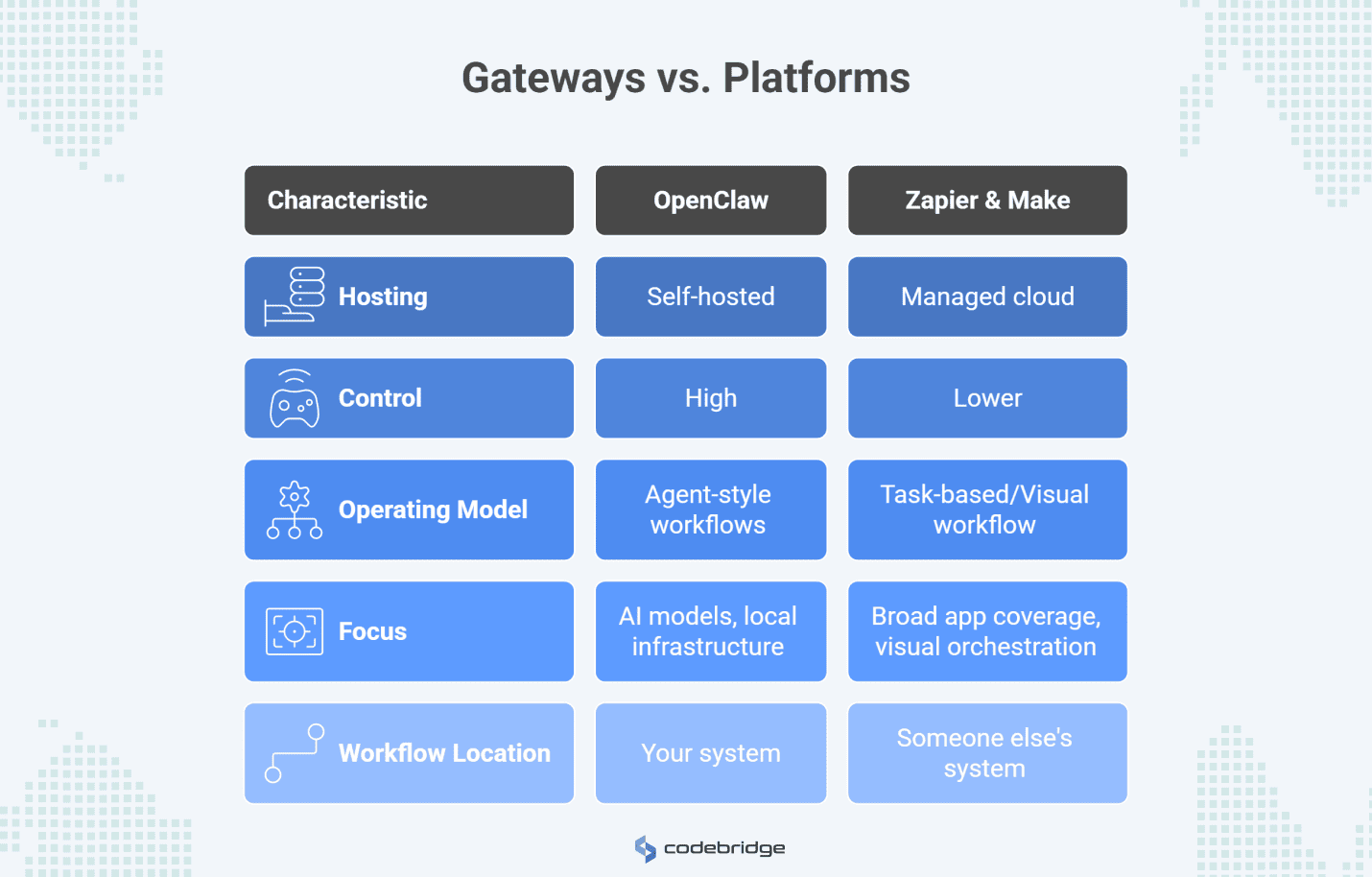
Before comparing costs or capabilities, it helps to name the category difference clearly. OpenClaw is not trying to be the same kind of product as Zapier or Make. It belongs to a different operating model, and that changes what the team controls, what the team inherits, and how automation fits into the wider system.
OpenClaw: The Self-Hosted Agent Gateway
OpenClaw is a self-hosted gateway that connects AI models to messaging channels and local or private infrastructure. It is designed for agent-style workflows that can use tools, retain context, and handle multi-step tasks across channels such as WhatsApp, Telegram, Slack, Discord, and iMessage. Because it runs on your own hardware, the team has direct control over configuration, approvals, sandboxing, and multi-agent routing.
Zapier and Make: Managed Automation Platforms
Zapier and Make are managed cloud platforms built to connect applications through vendor-hosted automation.
- Zapier is optimized for broad app coverage, accessible setup, and a task-based operating model, with newer AI features layered into that platform.
- Make uses a visual workflow model built around "scenarios" and "credits". It emphasizes visual orchestration and high-performance execution for complex data flows to help teams design and manage multi-step automation processes.
In both cases, the platform handles more of the operational layer for you, which makes adoption easier but also means the workflow lives inside someone else’s system boundaries.
The Primary Differentiator: Ownership Model
The key difference is where control sits and which team is responsible for running the system. That matters more than product design, because it determines where data runs, who controls execution, and which team absorbs the operational consequences when automation becomes business-critical.
Managed Convenience
With Zapier and Make, the vendor assumes responsibility for the entire infrastructure stack. They handle server provisioning, updates, security patches, and compliance certifications like SOC 2 Type II or ISO 27001. That lowers the effort required to get started and makes these tools easier to adopt across mixed or non-technical teams.
The trade-off is reduced flexibility over how the automation runs. Data passes through their cloud environment, execution is shaped by their limits and pricing model, and bigger changes to runtime behavior are constrained by what the platform exposes.
Self-Hosted Control
OpenClaw moves that boundary back to your side. You host the software on your own infrastructure (VPS, local hardware, or private cloud), and you decide exactly how it interacts with your environment. That can be valuable when workflows require tighter governance or more customization. But the benefit is inseparable from the burden: the team also becomes responsible for setup, security, monitoring, and ongoing maintenance. Self-hosting only pays off when that additional control matters enough to justify operating the system well.
From that point on, the question is whether the workflow justifies owning more of the automation stack.
The Strategic Advantages of OpenClaw
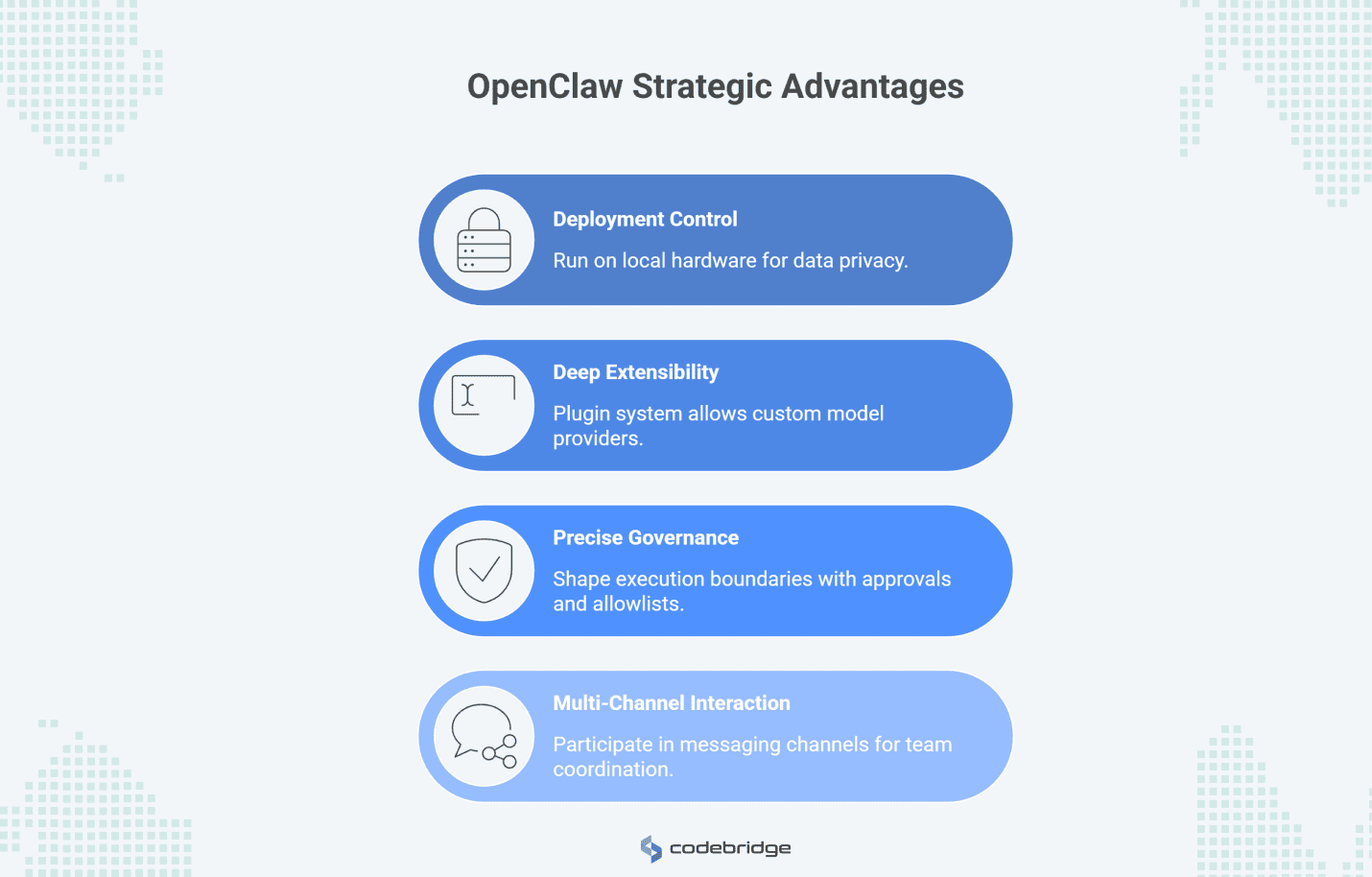
OpenClaw becomes more attractive when the workflow is important enough that control matters more than convenience. Its advantages are less about novelty and more about ownership: where the system runs, how far it can be extended, how tightly it can be governed, and how closely it can fit the channels where real work happens.
1. Deployment Control and Data Boundaries
OpenClaw can run on local hardware. Private VPS or internal infrastructure allows teams to have more control over sensitive data. That matters in domains where deployment location, privacy, or internal governance rules are part of the architecture rather than an afterthought. In those cases, self-hosting is a way to keep the automation layer inside the same boundary as the rest of the system.
2. Deep Extensibility via Plugins
OpenClaw is more adaptable when the workflow no longer fits the assumptions of a managed automation platform. Its plugin system allows teams to introduce new model providers, channels, tools, and supporting services in a way that is closer to software extension than to no-code configuration. That flexibility lets developers build agents that can work with local files and terminal commands, which most cloud tools restrict.
3. More Precise Governance and Guardrails
One of the stronger reasons to self-host is the ability to shape execution boundaries more explicitly. Features such as approvals, sandboxing, access profiles, and tool allowlists give teams more options for controlling how agents act, when human review is required, and how far a bad action can propagate. OpenClaw implements Exec Approvals, a safety interlock that requires explicit user approval before a sandboxed agent can run commands on a real host. When combined with Docker sandboxing, per-agent access profiles, and strict tool allowlists, these controls limit the damage a prompt-injected agent can cause.
4. Multi-Channel Agent Interaction
Zapier and Make are strong when the job is to move data between applications. OpenClaw becomes more interesting when the workflow revolves around interaction inside messaging channels such as Slack, Telegram, or WhatsApp. In those cases, the system is not just automating background tasks. It is participating closer to the place where teams coordinate, review, and respond.
Where SaaS Automation Remains the Smarter Choice
Despite the control offered by self-hosting, managed SaaS automation is often the more pragmatic choice for many business-critical workflows. When the job is mostly to connect business systems quickly and avoid turning automation into an internal platform, managed tools often win.
1. Faster Deployment With Less Setup Friction
Zapier and Make are easier to put into use quickly. Common automations such as routing leads into a CRM or moving data between SaaS tools can often be set up without touching infrastructure, managing SSH keys, or provisioning Docker containers. That matters when the priority is speed, especially for teams that need useful automation now rather than a more flexible system later.
2. Massive Integration Ecosystems
Managed platforms usually offer much wider prebuilt coverage across business applications, including many niche tools that internal teams would otherwise need to integrate themselves. That ensures that teams rarely have to build and maintain their own custom API integrations.
3. Reduced Operational Burden
The real cost of self-hosting is often obscured by a $5/month VPS sticker price. In reality, running a production-grade instance requires dedicated time for monitoring, backup management, and incident response. SaaS platforms abstract this complexity, offering predictable cloud operations and 99.9% SLAs that allow your engineering team to focus on building products rather than maintaining internal automation infrastructure.
The Hidden Costs and Trade-offs
Neither model is exempt from operational friction, though the nature of that friction differs.
Neither model is frictionless. The difference is where the burden appears and who ends up carrying it over time. With self-hosting, the visible cost may look low at first, but the operational responsibility is much higher. With SaaS, the platform is easier to run day to day, but costs and constraints tend to surface as workflow volume or dependency on the vendor grows.
OpenClaw: The Cost of Operating It Well
Operating OpenClaw in a production environment is effectively a part-time job. You are the sysadmin. If the system goes offline because a VPS runs out of memory or a security researcher discloses a new vulnerability (such as CVE-2026-25253), you are responsible for the fix. Furthermore, the lack of automated skill vetting means you must personally review the code for every third-party skill installed from the community.
SaaS: The Cost of Scaling Inside Platform Limits
The primary drawback of managed platforms is the "SaaS tax". Pricing models based on tasks or credits can become prohibitively expensive for high-volume or deeply branched workflows. Organizations often find themselves restricting useful automations to stay within a pricing tier rather than optimizing for business outcomes. Additionally, you are dependent on the vendor's roadmap. If a platform is acquired (as Pipedream was by Workday in 2025), you may face an unwanted migration. That may be acceptable for many workflows, but it is still a form of operational constraint.
Practical Decision Framework for Tech Leaders
At this point, the decision is about operating burden and cost behavior over time. The better choice depends on what the automation needs to touch, who needs to own it, and whether the workflow justifies carrying more of the system yourself.
Use Zapier or Make when:
- The workflow mostly moves data between standard SaaS tools and does not require unusual runtime control.
- Speed is the primary metric. You need a working solution in hours, not days, and cannot wait for engineering capacity.
- Non-technical ownership is required. Business teams (Marketing, HR, Sales) must be able to create and manage their own automations without IT intervention.
- Usage-based pricing remains economically acceptable at the scale you expect.
Use OpenClaw when:
- Self-hosting is a non-negotiable requirement. For compliance, security, or data sovereignty reasons, the execution must happen on private infrastructure.
- The agent needs to interact with local files, run shell commands, or manage internal development tools like CI/CD systems.
- You need to integrate proprietary models, write custom plugin logic, or implement complex "human-in-the-loop" approval flows that cloud platforms don't support.
- Workflow volume or branching is high enough that per-task SaaS pricing starts to shape the design more than the business needs.
The Hybrid Approach
Many mature technology organizations find the most success in a hybrid model. They use Zapier or Make for commodity backend automations, simple triggers that sync data across the stack, while reserving OpenClaw for sensitive, agent-heavy workflows that require deep context and engineering oversight.
Conclusion: The ROI of Ownership
The choice between OpenClaw and SaaS automation is a question of strategic priority. Zapier and Make remain the best options when speed, accessibility, and managed reliability are the primary drivers of value. They allow you to buy your automation infrastructure, converting engineering complexity into a predictable monthly expense.
OpenClaw makes sense when you need to build on top of the infrastructure. It is for the team that views their AI agent not just as a tool, but as a core system of intelligence that they must own and govern.
In 2026, the real return on investment for self-hosting is found in the long-term flexibility to evolve your agentic workflows without vendor-imposed boundaries. Now the question for executives is, "Is this workflow important enough to own?".




Heading 1
Heading 2
Heading 3
Heading 4
Heading 5
Heading 6
Lorem ipsum dolor sit amet, consectetur adipiscing elit, sed do eiusmod tempor incididunt ut labore et dolore magna aliqua. Ut enim ad minim veniam, quis nostrud exercitation ullamco laboris nisi ut aliquip ex ea commodo consequat. Duis aute irure dolor in reprehenderit in voluptate velit esse cillum dolore eu fugiat nulla pariatur.
Block quote
Ordered list
- Item 1
- Item 2
- Item 3
Unordered list
- Item A
- Item B
- Item C
Bold text
Emphasis
Superscript
Subscript









.jpg)


